A dependable build plate is one of those 3D-printer accessories that does not seem particularly exciting until a questionable first layer threatens to ruin a long print.
The Wefuit textured PEI build plate gives me another reliable surface for my Bambu Lab X1C without the price of a more specialized plate. It provides strong first-layer adhesion, releases prints easily after cooling, and leaves a clean textured finish on the bottom of the model.
It is also double-sided, thicker than many standard spring-steel plates, and includes a Bambu-compatible identification code. For the kind of regular printing I do, it is a practical replacement or spare plate that is easy to recommend.
A Proper Fit for the Bambu Lab X1C
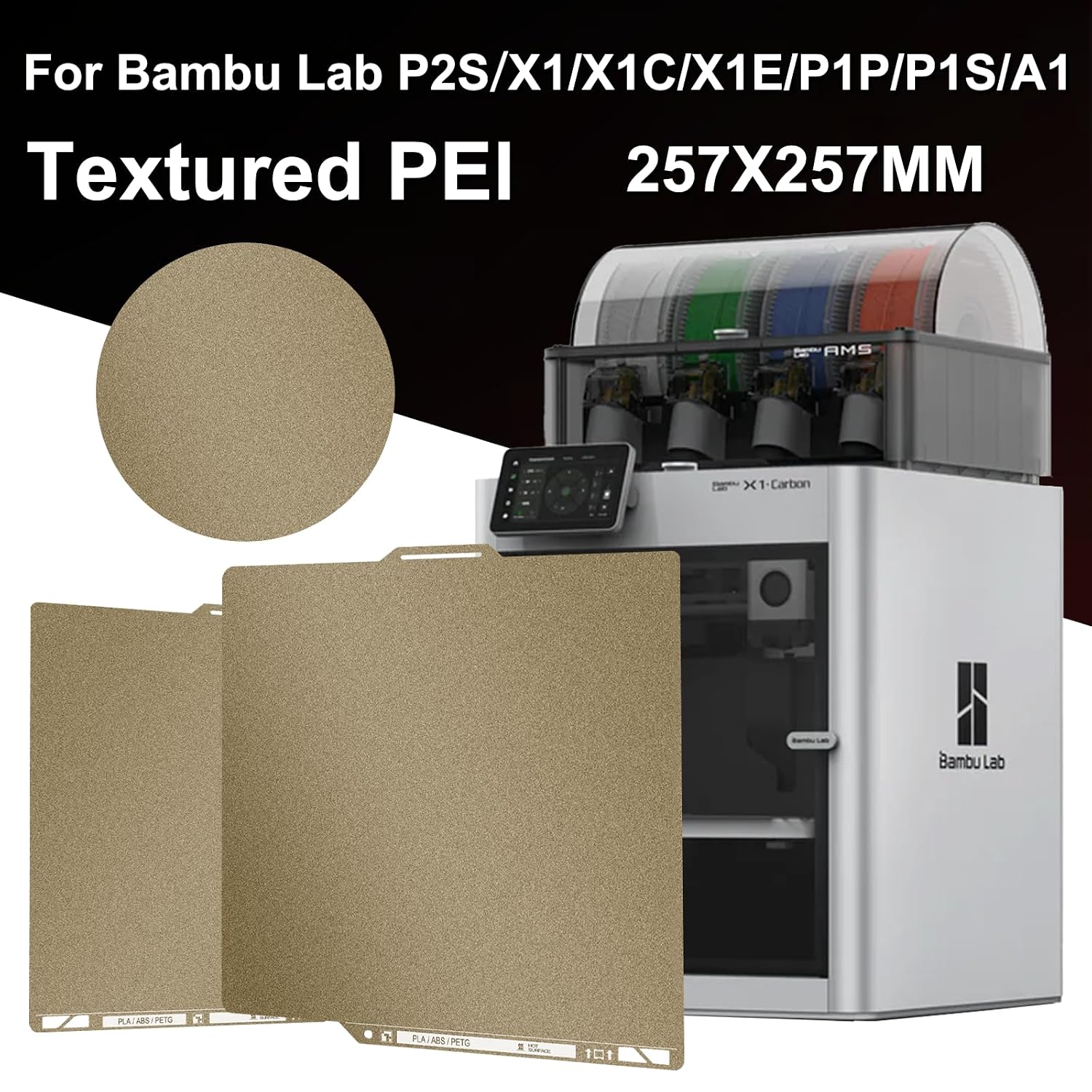
This plate measures 257 × 257 mm and is designed for compatible Bambu Lab printers, including the X1, X1C, X1E, P1P, P1S, and A1.
It fits properly on the magnetic bed of my X1C and aligns with the locating tabs at the back. Once installed, it sits flat without rocking or shifting around under normal printing conditions.
Wefuit lists the plate as 0.77 mm thick. It feels reassuringly substantial compared with some thinner aftermarket plates, but it remains flexible enough to bend when I need help releasing a large print.
The additional rigidity is particularly welcome when handling the plate or removing larger parts. It feels less flimsy without becoming difficult to use.
The Identification Code Is an Important Detail
One reason I chose this particular aftermarket plate is the printed identification code.
The X1C checks the build plate before printing and can display a warning when it does not recognize the installed surface. Many inexpensive aftermarket plates omit the code entirely, requiring the plate check to be disabled or the warning to be dismissed manually.
This one includes a code intended to identify it as a textured PEI plate. That helps it feel more like a native part of the Bambu workflow instead of an accessory the printer does not understand.
Plate recognition can still depend on the code being clean, visible, and correctly positioned, but including it is a meaningful advantage over generic alternatives.
Strong First-Layer Adhesion
The textured PEI surface provides very good adhesion for the PLA prints I produce most often. After the plate is clean and properly heated, the first layer goes down evenly and stays in place throughout the print.
That is especially important when printing large, flat components. Corners lifting from the bed can create visible warping or make separate pieces difficult to assemble accurately. A reliable PEI surface reduces that risk without requiring me to coat the plate in glue before every ordinary PLA print.
The powder-coated texture also provides many tiny high and low points for the filament to grip. This gives the first layer more mechanical hold than a completely smooth surface.
Wefuit lists compatibility with PLA, PLA+, PETG, PETG-CF, ABS, TPU, nylon, PC, PA, ASA, and PVA. Actual temperature and adhesive requirements vary by material, so I still use the appropriate Bambu Studio profile rather than treating every filament the same way.
Easy Removal After Cooling
Strong adhesion during printing is only half of what makes a good build plate. The model also needs to come off without turning removal into a wrestling match.
Once the plate cools, PLA parts usually release with very little effort. Smaller objects may lift away by hand, while larger pieces can be removed by gently flexing the spring-steel plate.
Waiting for the plate to cool is important. Trying to pull a large print from hot PEI places unnecessary stress on both the model and the coating. Bambu Lab similarly recommends allowing textured PEI plates to cool before removing prints. Bambu Lab textured PEI guidance
The combination of strong hot adhesion and easier cold release is exactly why textured PEI has become my preferred everyday printing surface.
A Clean Textured Finish
Every surface that touches the plate receives a fine stippled texture.
Instead of seeing smooth extrusion lines on the bottom, the finished piece has a consistent, lightly textured appearance. On many objects, that surface looks more polished and intentional than an ordinary smooth first layer.
This can be especially useful when the plate-facing side will become the visible front of a sign, badge, panel, or decorative component. Orienting the model strategically lets the build plate create the finished texture without adding another post-processing step.
The texture is noticeable but not excessively coarse. It gives the part a clean, production-ready appearance while still preserving the shape and detail of the first layer.
Double-Sided for Longer Service Life
Both sides of the plate have the textured PEI coating, so either can be used for printing.
That effectively gives me two usable printing surfaces. If one side becomes damaged or starts showing wear, I can turn the plate over instead of immediately replacing it.
It is also convenient when running multiple projects. I can remove one completed print, flip the plate, and begin preparing the other side while the first surface is being cleaned.
The two sides appear functionally similar rather than offering different textures. Anyone wanting both a smooth and textured finish should choose a combination plate instead, but I prefer having two copies of the surface I use most frequently.
Easy to Keep Clean
Textured PEI works best when it is free from fingerprints, dust, and filament residue. Skin oils can reduce adhesion even when the plate still looks clean.
For routine maintenance, I wash the plate with warm water and ordinary dish soap, rinse it thoroughly, and dry it with a clean lint-free towel. I avoid touching the printable area after cleaning and hold the plate by its edges whenever possible.
Wefuit specifically advises against cleaning this plate with acetone because it can damage the PEI coating. If adhesion suddenly becomes inconsistent, a proper soap-and-water cleaning is the first thing I try before changing temperatures or recalibrating the printer.
A Useful Spare for Production Printing
Even if the original Bambu plate is still in good condition, having a second plate is worthwhile.
I can start another print while a completed part is cooling on the first plate. I also have a backup available if one surface becomes dirty, damaged, or temporarily unavailable during a project.
That is particularly valuable when printing several parts for an order. A relatively inexpensive spare plate can keep the printer working instead of making the build surface a bottleneck.
It is not a flashy upgrade, but it is the kind that makes the everyday printing process run more smoothly.
Product Details
- Brand: Wefuit
- Product type: Double-sided textured PEI build plate
- Plate dimensions: 257 × 257 mm
- Advertised thickness: 0.77 mm
- Core material: Flexible spring steel
- Surface: Powder-coated textured PEI on both sides
- Identification: Bambu-compatible build-plate code
- Compatible printers: Bambu Lab X1, X1C, X1E, P1P, P1S, and A1
- Advertised temperature resistance: Up to 300°C
- Manufacturer-listed materials: PLA, PLA+, PETG, PETG-CF, ABS, TPU, nylon, PC, PA, ASA, and PVA
- ASIN: B0DJR5FP1X
These specifications and compatibility claims come from the current Amazon product listing.
What Could Be Better
This is a textured plate on both sides. That is ideal if textured PEI is what I want, but it does not provide the versatility of a combination plate with one smooth side.
The identification code is also printed near the edge of the plate, where repeated handling or aggressive cleaning could eventually affect it. I am careful not to scrape that area unnecessarily.
Like any PEI surface, it still requires cleaning. The coating cannot compensate indefinitely for fingerprints, dust, or filament residue, so occasional washing is part of owning it.
Finally, the long compatibility list should not be interpreted as meaning every material can use identical settings. Some engineering filaments require different bed temperatures, enclosure conditions, or a release agent to protect the surface. I always follow the filament and printer recommendations rather than relying solely on the plate’s general compatibility list.
My Verdict
The Wefuit textured PEI build plate does everything I need an everyday X1C plate to do.
It fits properly, provides dependable adhesion, releases prints after cooling, and gives the bottom of each part a clean textured finish. Its 0.77 mm construction feels sturdy while retaining enough flexibility for easy model removal.
The included identification code is one of its best features because it helps preserve the plate-checking workflow that makes the X1C so convenient. The double-sided coating and affordable price also make it a strong value as either a replacement plate or a production spare.
If you own a compatible Bambu Lab printer and want a dependable textured PEI surface without spending a lot, this is a simple, useful upgrade that I am happy to recommend.
Check the current price on Amazon
Disclosure: This post contains affiliate links. If you purchase through one of these links, I may earn a small commission at no additional cost to you. My recommendations are based on products I genuinely find useful and worth sharing.